
Free output and byproduct storage with Storage Sheds, then resume production. In Beyond These Stars, “no output space” can mean that waste is blocking a building, even when you still need its main product. Start at the affected building's panel and check both its output and its byproducts before changing the rest of your production chain.
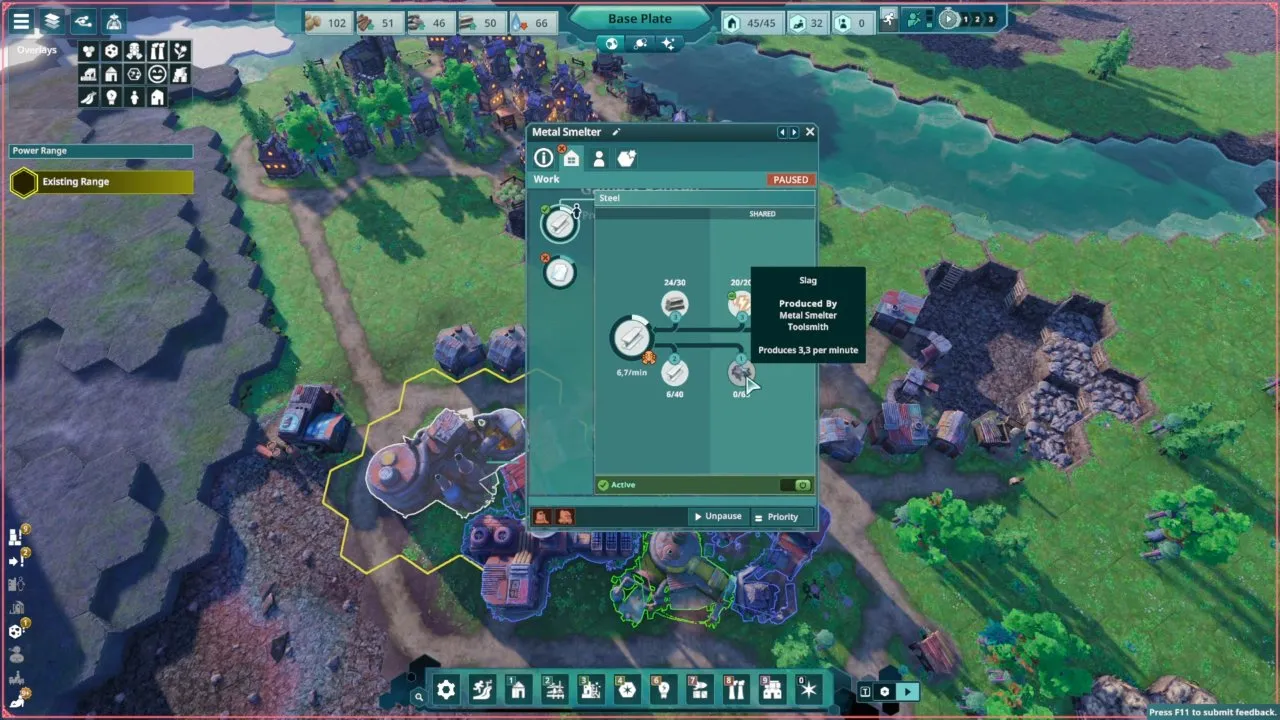
How do you fix no space in Beyond These Stars?
Check which output or byproduct is full, make storage room for it, and restart production according to what you need. A Metal Smelter can stop when either its product storage or its byproduct storage fills up. Looking only at the resource you wanted to produce can leave you chasing the wrong shortage.
- Open the stopped building. Read its warning icons and red text, then inspect its output and byproduct storage. For a smelter, either category can prevent further production.
- Provide Storage Sheds for the accumulating resources. Early on, sheds are the way to manage excess soot and slag. Check the shed's storage settings as well as its capacity: a shed only takes the resource types it is set to store.
- Pause production that is adding unwanted surplus. Adjust priorities around the resources you actually need. Keeping every producer running can keep adding to the same excess you are trying to manage.
- Resume the production you need. Unpause and change priorities as demand changes. Treat the pause as a way to control the buildup while you make room, rather than as a way to remove stored resources.
The important distinction is between a missing input and a blocked output. Before adding another producer for a shortage, trace the affected step in your Beyond These Stars resources chain. A building that cannot store its byproduct needs somewhere for that byproduct to go.
Why does a generator say no space while factories lack input?
A generator can stop producing electricity when there is no room for its waste, leaving buildings that depend on that electricity without an input. The generator shows “No Space” while the factories it powers show missing input.
If you see that pattern, inspect the generator's waste storage before concentrating on the factories. The factory warning can be the downstream symptom of the generator's storage problem. Giving the generator room to handle its waste addresses that blockage at the producer.
Once you have dealt with storage, check that the affected building receives electricity directly from a nearby generator or through a functioning network. Follow Beyond These Stars connect power when you need to work through the connection side of the problem. Storage and power are separate checks, and a stopped generator is where they can meet.
How much can a Storage Shed hold?
A Storage Shed holds 80 units: four resource types at 20 each. A later perk adds another 20 of capacity. Put sheds next to the buildings whose waste they collect so Peeps carry it a short distance.
Extra capacity gives you more room for accumulating resources. It still leaves you with a production decision: keep making something you need, or pause a producer whose output is already in excess. If you keep producing surplus soot or slag, the resources still need storage or a use.
What should you do with excess soot and slag?
Store soot and slag early, control excess production, and put them to use as more buildings become available. Later buildings consume them: the Fuel Plant processes slag, for example. Until you reach those buildings, manage the buildup with sheds, pauses, and priorities.
The Cleaner uses soot and water to clean polluted tiles, so it gives early soot a real use. It unlocks once your Burner Generator has produced 50 soot. For the cleanup side of that decision, continue with Beyond These Stars pollution.
Pausing production helps prevent more surplus from accumulating; it does not delete the soot or slag you already have. Resume a producer when you need its product, and adjust its priority to match that need.
What if the Metal Smelter still will not produce?
Check workers, raw materials, and electricity after checking output and byproduct storage. For a Metal Smelter, make sure it is within housing range, has enough available peeps for its work slots, and can access enough sand from the Sand Mine through nearby storage.
Read the building panel again for the remaining warning. Clearing storage removes a storage blockage, but the smelter still needs its other production requirements. Once those are met, you can return to the resource chain you were trying to run, with space for both the product you want and the byproducts that come with it.